I just bought a desktop computer along with a Dell 22-inch ultrasharp monitor. The quality is pretty good as long as you configure it a little. Definitely recommend it because the price is awesome and the colors are decent enough for you to enjoy.
I'd agree with everything Kent Bye said. 30" COMPUTER screens are 2560x1600 px. Make sure that's the case before purchasing. AFAIK that's the largest computer screen available. Larger screens are TV's not computer screens and have low PPI.
Btw, 1600px is the WIDTH of a 17" MacBook Pro screen and the HEIGHT of a 30" monitor! :)
As far as I know Apple laptops have TN panels (which I'm close to call a shame), so they're not the brightest.
Color and white point calibration would help a lot, but you'll never get the same image comparing such different displays.
9 January 2008 - 10:18pm — Anonymous (not verified)
I recently made the jump to a 30" and would recommend it, and I've got a couple of tips and warnings.
I ended up going with Samsung, which was so popular that it was actually a bit of a pain to find one quickly. But that was the brand that seemed to have the best reviews.
Also a warning: just because a 30" monitor has a DVI input doesn't mean that it has the proper PPI (i.e. Pixels per inch) that can drive a full 2560x1600 resolution. Especially if you're price shopping online. I'm just saying that you may end up with a new TV that has lower computer resolution than a MacBook Pro screen. So PPI can be more important than screen size. My parents had a 40" HDTV that I connected to my laptop via VGA, and even that was lower resolution than the MacBook Pro screen.
But Firebug is great with the extra space. And with the Web Developer Toolbar, you can resize the Firefox browser to different sizes like 1400x1350 (wide) or 1100x1575 (tall) and not do as much scrolling.
It's also great to have your IDE on the left and browser on the right, and have them pretty much on the same screen at the same time without having to shuffle windows.
Apple PR also claims that 30" screen will increase your productivity by 40-73%, and I'd say that may be a bit overstating it. But I'd say that you could reasonably expect a 20-40% productivity boost on doing web dev.
I would totally recommend it. It kicks arse. Make sure you check out the options and that your video card supports it (e.g. 13" MacBooks can't run 30" monitors). Dell probably still has the best value for money right now. Apple probably has the best quality (but you pay for it). However the difference in quality between low and high cost monitors is much less at the 30" range than the <24" range. e.g. Both Dell and Apple 30" monitors are very high quality. However the cheapest 19" LCD is awful quality compared to an expensive/good one. Also make sure you've got a budget for it and look out for deals. I got mine at about 70% of current RRP just by waiting for an offer from Dell (and being a student).
Disadvantages; none really. Cost, it's flat, any other screen feels cramped, it uses more memory and processor-cycles, less environmentally-friendly. I don't notice a difference on my MacBook Pro in regards to performance and resource-usage except very occasionally with full-screen 3D rendering or video decompression. Due to it's size the left and right sides aren't very useful, so I'm often doing a lot of dragging to get the window I'm typing in the middle and other windows on the sides. If it were rounded like this prototype from Alienware this would be less of an issue -- although then the health of my neck would be an issue...
As a side question, I was wondering what the (dis)advantages of doing (Drupal) development on a 30" screen monitor are. Would you also recommend it if you already had a 20" monitor?
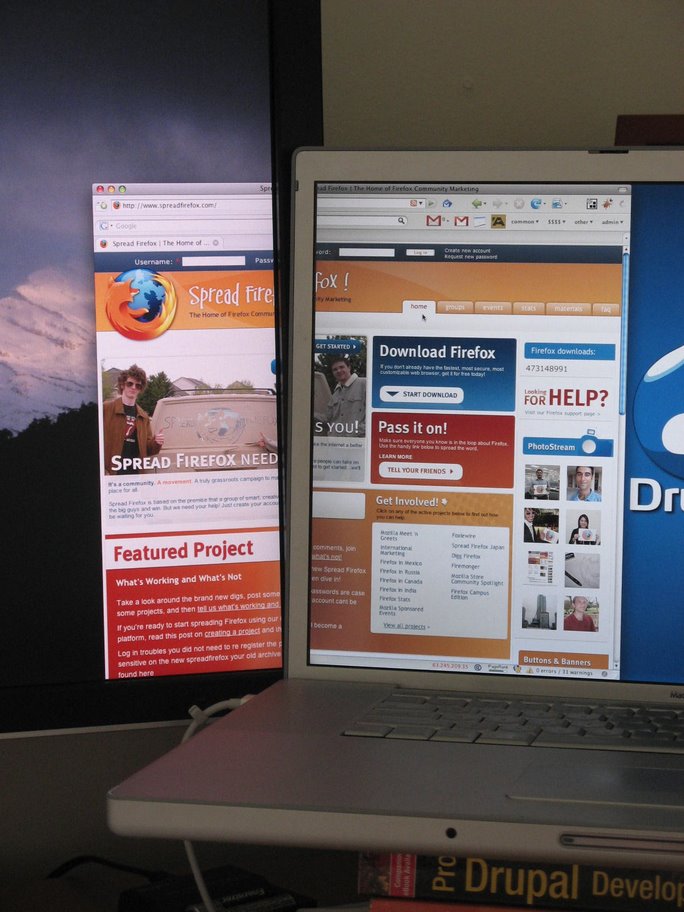
I just noticed that although I had color-calibrated the Dell monitor some time ago, the calibrated profile was not in use. For some reason OS X was using the default profile. That helps the issue considerably.
How is the Dell working out.
What is your opinion on the Dell now that its been seven month's??
I'm thinking of getting one from Ebay.
Dell Ain't So Bad
I just bought a desktop computer along with a Dell 22-inch ultrasharp monitor. The quality is pretty good as long as you configure it a little. Definitely recommend it because the price is awesome and the colors are decent enough for you to enjoy.
Yeah - 30" COMPUTER screens
Yeah - 30" COMPUTER screens are 2560x1600 px.
It's very hard to find good information about that
Thanks for the sharing.
Best Regards
I've got the Dell
I've never tried the the Mac but I can personally vouch for the Dell. I've got one myself and the quality is good
I think that's probably the
I think that's probably the camera not white-zeroing correctly.
I've heard that Apple and
I've heard that Apple and Dell have the same panels in them -- not sure how reliable that info is though
:) And the Drupal desktop
:) And the Drupal desktop wallpaper
I'd agree with everything
I'd agree with everything Kent Bye said. 30" COMPUTER screens are 2560x1600 px. Make sure that's the case before purchasing. AFAIK that's the largest computer screen available. Larger screens are TV's not computer screens and have low PPI.
Btw, 1600px is the WIDTH of a 17" MacBook Pro screen and the HEIGHT of a 30" monitor! :)
Note the subtle PDD
I totally like how you sneaked in the Pro Drupal Development book into the picture :D
Color hue
By the way, the Dell looks a bit red-ish to me ;)
Different panels
As far as I know Apple laptops have TN panels (which I'm close to call a shame), so they're not the brightest.
Color and white point calibration would help a lot, but you'll never get the same image comparing such different displays.
go out!
geeks . )
I'd also recommend it
I recently made the jump to a 30" and would recommend it, and I've got a couple of tips and warnings.
I ended up going with Samsung, which was so popular that it was actually a bit of a pain to find one quickly. But that was the brand that seemed to have the best reviews.
Also a warning: just because a 30" monitor has a DVI input doesn't mean that it has the proper PPI (i.e. Pixels per inch) that can drive a full 2560x1600 resolution. Especially if you're price shopping online. I'm just saying that you may end up with a new TV that has lower computer resolution than a MacBook Pro screen. So PPI can be more important than screen size. My parents had a 40" HDTV that I connected to my laptop via VGA, and even that was lower resolution than the MacBook Pro screen.
But Firebug is great with the extra space. And with the Web Developer Toolbar, you can resize the Firefox browser to different sizes like 1400x1350 (wide) or 1100x1575 (tall) and not do as much scrolling.
It's also great to have your IDE on the left and browser on the right, and have them pretty much on the same screen at the same time without having to shuffle windows.
Apple PR also claims that 30" screen will increase your productivity by 40-73%, and I'd say that may be a bit overstating it. But I'd say that you could reasonably expect a 20-40% productivity boost on doing web dev.
I would totally recommend it.
I would totally recommend it. It kicks arse. Make sure you check out the options and that your video card supports it (e.g. 13" MacBooks can't run 30" monitors). Dell probably still has the best value for money right now. Apple probably has the best quality (but you pay for it). However the difference in quality between low and high cost monitors is much less at the 30" range than the <24" range. e.g. Both Dell and Apple 30" monitors are very high quality. However the cheapest 19" LCD is awful quality compared to an expensive/good one. Also make sure you've got a budget for it and look out for deals. I got mine at about 70% of current RRP just by waiting for an offer from Dell (and being a student).
Disadvantages; none really. Cost, it's flat, any other screen feels cramped, it uses more memory and processor-cycles, less environmentally-friendly. I don't notice a difference on my MacBook Pro in regards to performance and resource-usage except very occasionally with full-screen 3D rendering or video decompression. Due to it's size the left and right sides aren't very useful, so I'm often doing a lot of dragging to get the window I'm typing in the middle and other windows on the sides. If it were rounded like this prototype from Alienware this would be less of an issue -- although then the health of my neck would be an issue...
Check out other reviews for more details; http://www.google.com/search?q=Dell+30%22+LCD+review
There will probably be more details in an upcoming CivicActions blog posting
Side question: developing on a 30" screen
As a side question, I was wondering what the (dis)advantages of doing (Drupal) development on a 30" screen monitor are. Would you also recommend it if you already had a 20" monitor?
I just noticed that although
I just noticed that although I had color-calibrated the Dell monitor some time ago, the calibrated profile was not in use. For some reason OS X was using the default profile. That helps the issue considerably.